
Checking a model
A finite element result is only as good as the model behind it, and the commonest mistakes give no error: a load on the wrong node, a beam bent about its weak axis, a joint the solver quietly leaves undone. xfea doesn’t try to judge a model with a list of rules. It makes the model observable, at every stage, so that you and your AI can see what was built and what came out, and check it the way an engineer would.
| Stage | What you get | What to look for |
|---|---|---|
| Before solving | the model picture | parts, supports, loads and joints where they should be |
| Before solving | model.check() |
what a solver would get wrong without saying so |
| During the solve | the run record, xfea status |
increments, iterations, residuals: is it converging? |
| After the solve | the solver’s warnings | what the solver itself noticed |
| After the solve | the results and the report | equilibrium, a hand check, the numbers that answer the question |
Before solving: look at the model
Section titled “Before solving: look at the model”The model picture draws each part with its mesh, the supports as black markers (a square fixed, a triangle pinned)
and the loads as red arrows, and lists the interfaces between parts. (In the 3D viewer, supports are red and loads
blue.) Your AI assistant draws it with render_model after building the model, before any time
is spent solving; you can open the same model in 3D in your browser.
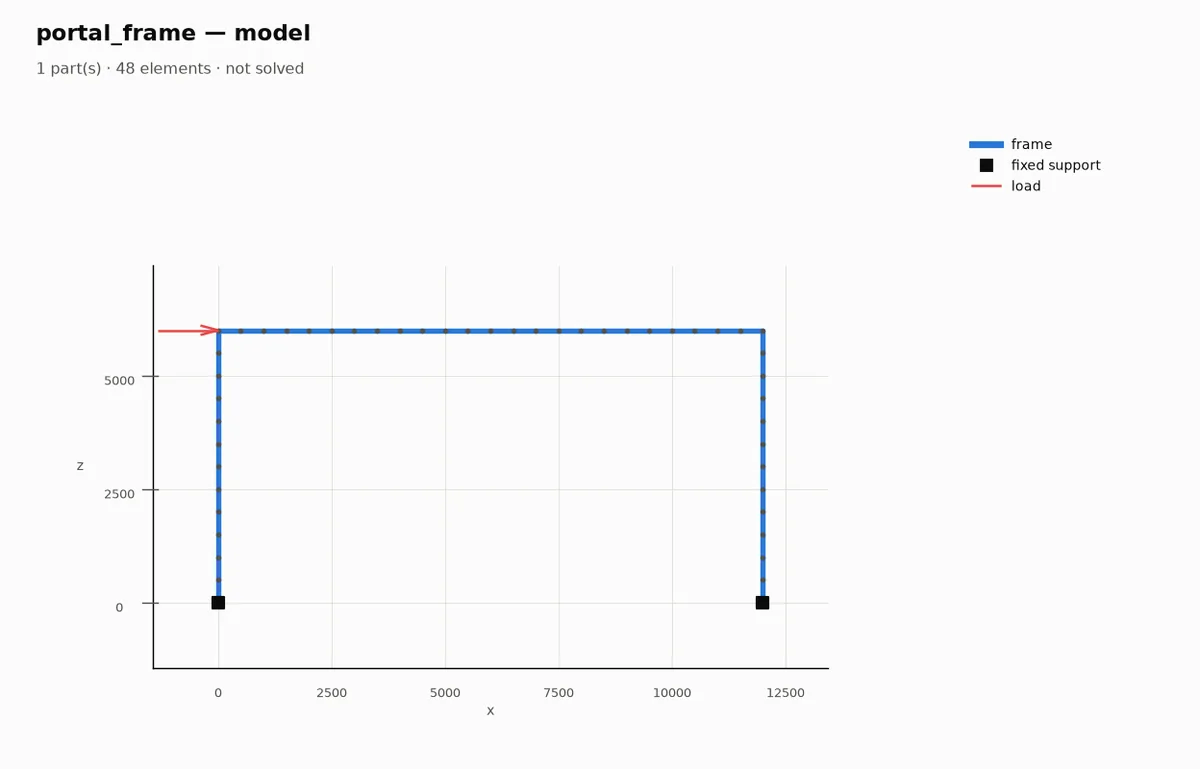
The model before it is solved: supports and loads where the request put them.
Before solving: model.check()
Section titled “Before solving: model.check()”model.check() lists what a solver would get wrong without saying so, and every solve runs it and logs what it
finds:
for warning in model.check(): print(warning)It covers cases where the input is valid but the answer isn’t: a node held by a support on the slave side of a tie, which a solver can leave untied; a node both coupled and held, which gets two prescriptions for one movement; and what the solver plugin in use knows about its own solver, such as a section it can only approximate.
During the solve: the run record
Section titled “During the solve: the run record”Every solve writes a run record as it goes (run.jsonl, then run.json): the step, the increment, the iteration,
the force residual, cutbacks. xfea status <folder> -f follows it in a terminal, and your AI follows it with
run_status, stopping a solve that goes nowhere: residuals that stop falling, increments cut back again and again,
which usually means a mechanism or a missing support, not a numerical problem.
After the solve: warnings, equilibrium, a hand check
Section titled “After the solve: warnings, equilibrium, a hand check”problem.solver_warningsholds what the solver warned about. They’re in the report too.- Equilibrium: the reactions add up to the loads. If they don’t, a load or a support is not where you think.
- A hand check: a formula, a simpler model, a bound. A script can print it next to the result.
The report
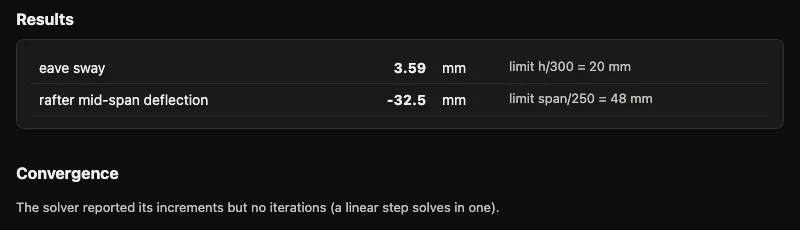
Section titled “The report”Every solve writes report.html beside its results: the numbers you recorded with problem.record_result, the
convergence, the model’s make-up, the warnings and the times. One page to read, keep with the calculation, or send.
How xfea itself is checked
Section titled “How xfea itself is checked”Verification runs a set of reference cases (formulas, standards, other models) through the same path as yours and publishes how each compares, failures included.
In the examples
Section titled “In the examples”- Working with your AI follows one model through every stage above.
- The reference cases each check a result against a known answer.
© 2026 Francesco Ranaudo · Text and pictures CC BY 4.0 · Code Elastic License 2.0 · how to reuse them